Daytona Integration
Creddy's Daytona plugin creates ephemeral API keys for managing Daytona workspaces (sandboxes). Agents request a key, create dev environments, and keys are automatically revoked on expiry.
How It Works
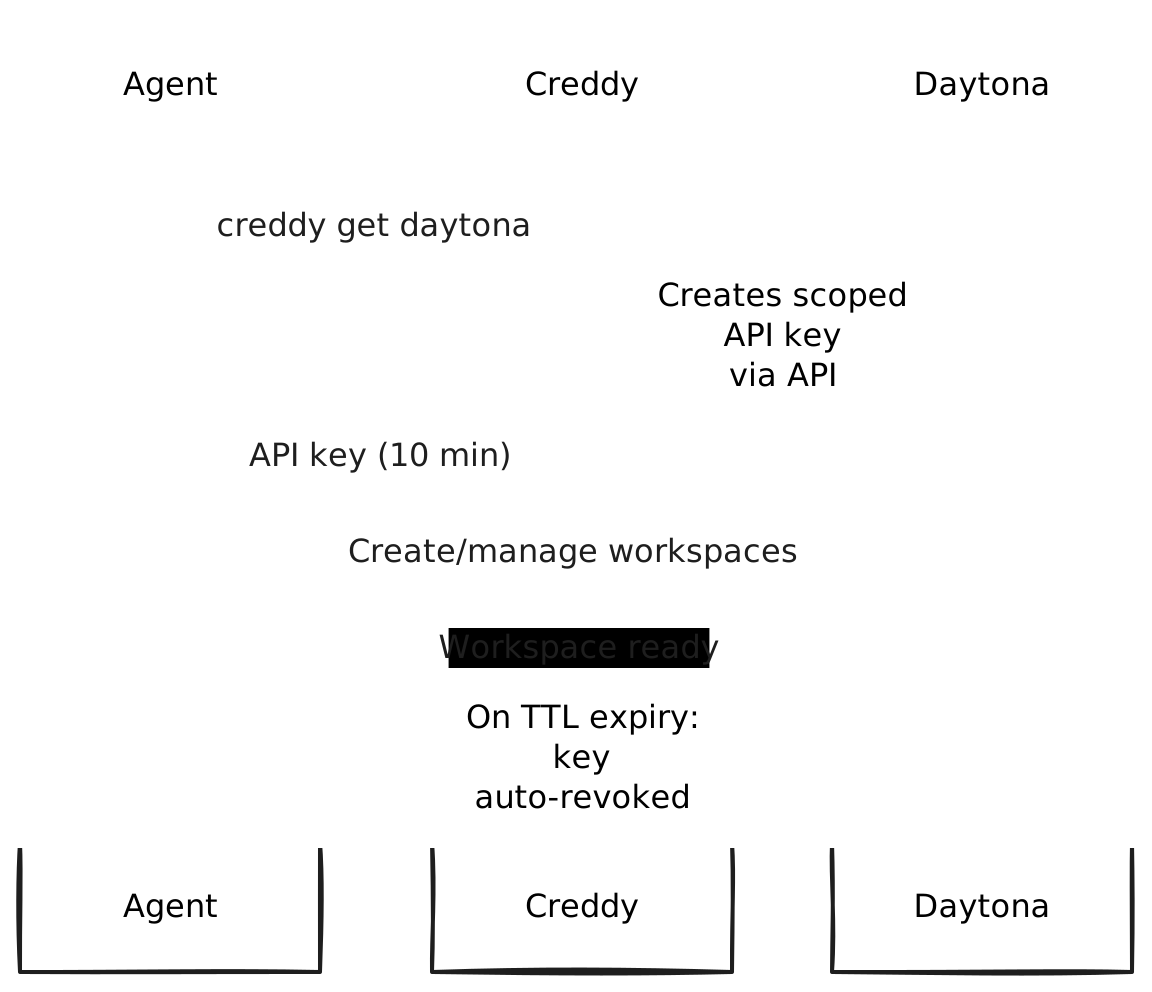
- Agent requests
creddy get daytona - Creddy creates a scoped API key via Daytona's API
- Agent uses key to create/manage workspaces
- On TTL expiry → key automatically revoked
Key benefits:
- No hardcoded API keys in agent configs
- Keys are time-limited and automatically cleaned up
- Organization-scoped access control
- Audit trail of key creation/usage
Requirements
- Daytona account with API access
- API key from Daytona Dashboard
Installation
creddy plugin install daytonaServer Setup
Add the backend with your Daytona API key:
creddy backend add daytonaYou'll be prompted for:
- api_key: Daytona API key
- base_url: API endpoint (default:
https://api.daytona.io)
Configuration Options
{
  "api_key": "daytona_xxx",
  "base_url": "https://api.daytona.io",
  "organization_id": "org-123"
}| Option | Description | Default |
|---|---|---|
api_key | Daytona API key (required) | — |
base_url | Daytona API endpoint | https://api.daytona.io |
organization_id | Default org for all keys | — |
Agent Enrollment
Agents request Daytona access during enrollment:
creddy enroll --server http://creddy:8400 --name ci-agent \
  --can daytona
Or for specific organizations:
creddy enroll --server http://creddy:8400 --name ci-agent \
  --can daytona:org:myorg
Requesting API Keys
Once enrolled and approved:
# Get an API key
DAYTONA_KEY=$(creddy get daytona)

# Use with Daytona API
curl -H "Authorization: Bearer $DAYTONA_KEY" \
  https://api.daytona.io/workspaces
Custom TTL
# Key valid for 1 hour
DAYTONA_KEY=$(creddy get daytona --ttl 1h)
Use Cases
CI/CD Pipeline
# GitHub Actions
jobs:
  test:
    steps:
      - name: Get Daytona credentials
        run: |
          echo "DAYTONA_KEY=$(creddy get daytona --ttl 30m)" >> $GITHUB_ENV

      - name: Create sandbox
        run: |
          WORKSPACE_ID=$(curl -X POST \
            -H "Authorization: Bearer $DAYTONA_KEY" \
            -H "Content-Type: application/json" \
            https://api.daytona.io/workspaces \
            -d '{"repository": "${{ github.repository }}"}' \
            | jq -r '.id')
          echo "WORKSPACE_ID=$WORKSPACE_ID" >> $GITHUB_ENV

      - name: Run tests
        run: |
          daytona exec $WORKSPACE_ID -- make test

      - name: Cleanup
        if: always()
        run: |
          curl -X DELETE \
            -H "Authorization: Bearer $DAYTONA_KEY" \
            https://api.daytona.io/workspaces/$WORKSPACE_ID
AI Coding Agent
import subprocess
import requests

# Agent needs to spin up isolated dev environment
api_key = subprocess.check_output(
    ["creddy", "get", "daytona", "--ttl", "2h"]
).decode().strip()

headers = {"Authorization": f"Bearer {api_key}"}

# Create workspace for the task
workspace = requests.post(
    "https://api.daytona.io/workspaces",
    headers=headers,
    json={"repository": "github.com/org/repo"}
).json()

# Execute code in sandbox
result = requests.post(
    f"https://api.daytona.io/workspaces/{workspace['id']}/exec",
    headers=headers,
    json={"command": "python test.py"}
)
Ephemeral Preview Environments
#!/bin/bash
# Deploy PR preview

DAYTONA_KEY=$(creddy get daytona --ttl 4h)
PR_NUMBER=$1

# Create workspace for PR
WORKSPACE=$(curl -X POST \
  -H "Authorization: Bearer $DAYTONA_KEY" \
  https://api.daytona.io/workspaces \
  -d "{\"repository\": \"$REPO\", \"branch\": \"pull/$PR_NUMBER/head\"}" \
  | jq -r '.id')

echo "Preview ready at: https://$WORKSPACE.daytona.app"
Scopes
| Scope | Description |
|---|---|
daytona | Full Daytona API access |
daytona:workspaces | Create and manage workspaces |
daytona:workspaces:read | List and view workspaces only |
daytona:org:* | Access scoped to specific organization |
TTL Constraints
- Minimum TTL: 1 minute
- Maximum TTL: 24 hours
- Default TTL: 10 minutes
Security Considerations
API Key Security
- Keys are scoped to specific organizations if configured
- Keys have TTL and are automatically revoked
- Each agent gets unique keys (no sharing)
Best Practices
- Use short TTLs for untrusted environments
- Scope to specific organizations when possible
- Review Creddy audit logs for unusual patterns
- Use
daytona:workspaces:readwhen full access isn't needed
Troubleshooting
"invalid API key"
Ensure your master API key:
- Is a valid Daytona API key
- Has permission to create additional API keys
- Hasn't expired
"organization not found"
Check the organization ID:
- Matches exactly (case-sensitive)
- Your API key has access to that organization
Workspace creation fails
- Verify the API key has workspace creation permissions
- Check repository URL is accessible
- Review Daytona dashboard for quota limits