GitHub Integration
✅ Vend Mode: Creddy creates real GitHub tokens. Agents use them directly with GitHub's API.
Creddy's GitHub integration provides scoped, ephemeral installation tokens for your AI agents. Instead of sharing personal access tokens, agents request short-lived tokens with access to only the repositories they need.
How It Works
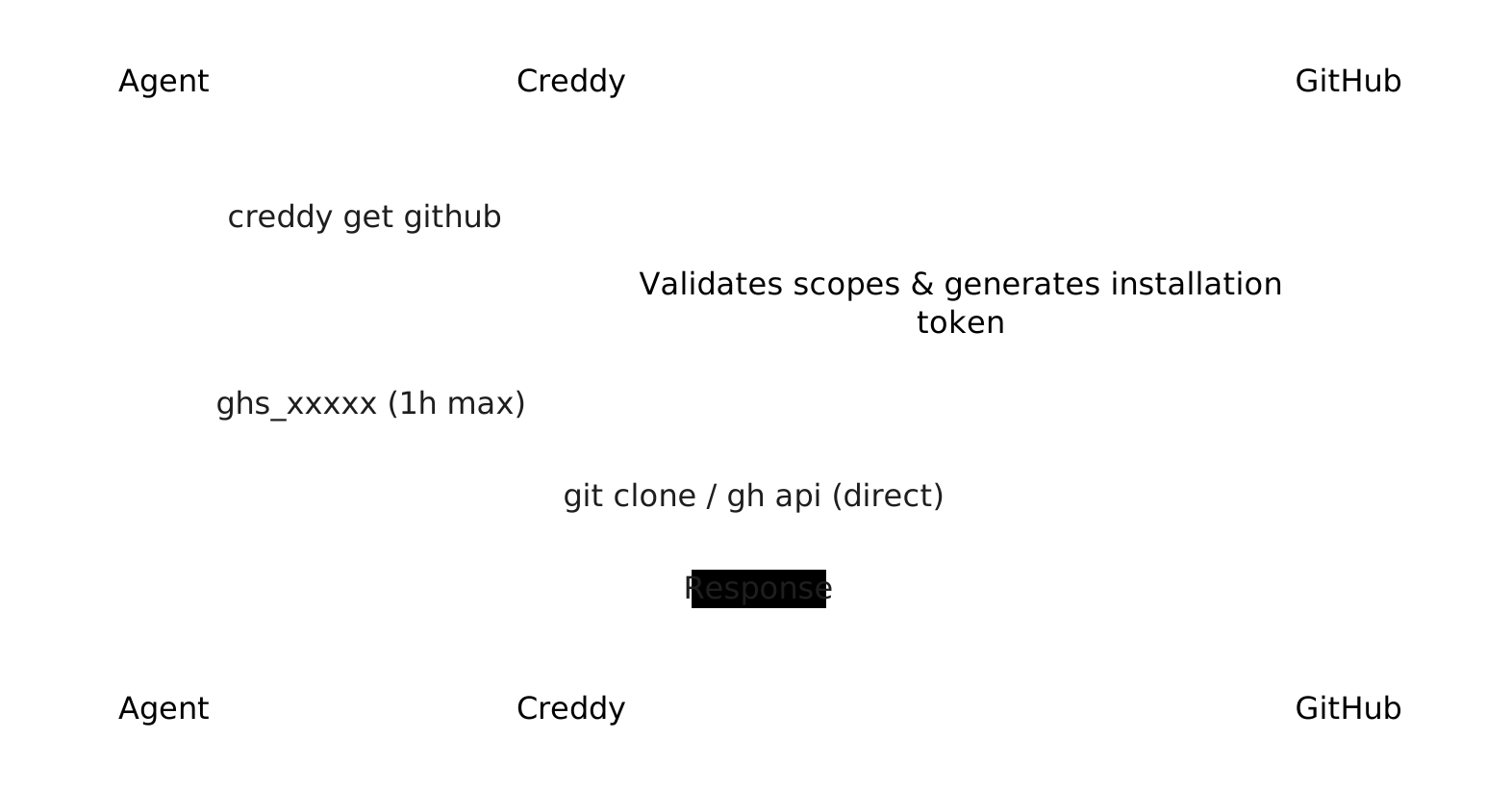
Creddy uses a GitHub App to generate installation tokens. When an agent requests a GitHub credential:
- Agent authenticates with Creddy using its agent token
- Creddy validates the agent's scopes (which repos it can access)
- Creddy generates a GitHub App installation token scoped to those repos
- Token is returned to the agent (expires in 1 hour max)
Key Concepts
Before setup, understand these key points:
- One GitHub App — Create a single GitHub App that Creddy uses to generate tokens
- Install per org/user — Install the app into each GitHub org or user account where agents need access
- Max permissions on app — The GitHub App needs the maximum permissions any agent might request. Creddy can only reduce permissions, never expand beyond what the app has.
- No webhooks needed — Creddy only generates tokens; it doesn't receive events from GitHub
Installation
Install the GitHub plugin:
creddy plugin install githubConfiguration
1. Create a GitHub App
-
Basic info:
- Name:
creddy-yourcompany(must be globally unique) - Homepage URL: Your Creddy server URL (or any URL)
- Name:
-
Webhook:
- ❌ Uncheck "Active" — Creddy doesn't need webhooks
-
Permissions — Set the maximum any agent might need:
Permission Level Use Case Contents Read & Write Clone, push, read files Metadata Read Required for all operations Pull requests Read & Write Create/manage PRs Issues Read & Write Create/manage issues Actions Read Check workflow status Commit statuses Read & Write Set status checks Start with Contents + Metadata. Add more as needed.
-
Where can this app be installed?
- "Only on this account" for private use
- "Any account" if agents need access across orgs
-
Create the app and note the App ID (shown at top of app settings)
-
Generate a private key:
- Scroll to "Private keys" section
- Click "Generate a private key"
- Downloads a
.pemfile — keep this secure!
2. Install the App
- From your app's settings page, click "Install App" in the sidebar
- Choose the org or user account to install on
- Select "All repositories" or specific repos
- Click Install
- Note the Installation ID from the URL:
https://github.com/settings/installations/12345678
                                           ^^^^^^^^
                                           This is your installation ID
Repeat for each org where agents need access.
3. Configure Creddy
# Add the GitHub backend
creddy backend add github \
  --app-id 123456 \
  --installation-id 12345678 \
  --private-key /path/to/app.pem
Or via API:
curl -X POST http://localhost:8400/v1/admin/backends \
  -H "Content-Type: application/json" \
  -d '{
    "type": "github",
    "name": "github",
    "config": {
      "app_id": 123456,
      "installation_id": 12345678,
      "private_key_pem": "-----BEGIN RSA PRIVATE KEY-----\n..."
    }
  }'
Agent Enrollment
Agents request access to specific repositories during enrollment:
# Agent requests enrollment with repo access
creddy enroll http://creddy-server:8400 --name my-agent \
  --can github:owner/repo1 \
--can github:owner/repo2Authentication: Agents can authenticate to Creddy using either vend tokens (
ckr_xxx) or OIDC (client_id/client_secret). Both work with GitHub.
Scope Format
| Scope | Description |
|---|---|
github:owner/repo | Access to a specific repository (read/write) |
github:owner/repo:read | Read-only access to a repository |
github:owner/repo:write | Explicit read/write access |
github:owner/* | Access to all repos under an owner |
github:* | Access to all repos the app can see |
Read-Only Scopes
Suffix :read to restrict an agent to read-only access:
creddy enroll http://creddy-server:8400 --name ci-bot \
  --can github:myorg/frontend:read \
  --can github:myorg/backend:read
This agent can only request read-only tokens—even if it tries --read-only=false, Creddy will enforce the ceiling.
Requesting Tokens
Once enrolled and approved, agents can request tokens:
# Get a token for all your repos
creddy get github

# Get a read-only token
creddy get github --read-only

# Narrow to specific repos (subset of what you're allowed)
creddy get github --repo owner/repo1

# Custom TTL (max 1 hour)
creddy get github --ttl 30m
Using the Token
The returned token works with any GitHub API client:
# Set the token
export GITHUB_TOKEN=$(creddy get github)

# Use with git
git clone https://x-access-token:${GITHUB_TOKEN}@github.com/owner/repo.git

# Use with gh CLI
gh api repos/owner/repo

# Use with curl
curl -H "Authorization: Bearer $GITHUB_TOKEN" \
  https://api.github.com/repos/owner/repo
Verifying Token Scopes
To confirm tokens are properly scoped to specific repos:
# Get a scoped token
export GH_TOKEN=$(creddy get github)

# ✅ Should work - access your scoped repo
gh api repos/owner/allowed-repo/issues

# ❌ Should fail (404) - access a different private repo
gh api repos/owner/other-repo/issues

# ✅ Should work - create an issue in allowed repo
gh issue create --repo owner/allowed-repo --title "Test" --body "Token scoping works!"

# ❌ Should fail - create issue in different repo
gh issue create --repo owner/other-repo --title "Test" --body "This should fail"
If the token is correctly scoped, you'll get a 404 "Not Found" when accessing repos outside your agent's permissions.
Adding More Repos Later
Agents can request additional repository access after enrollment:
# Agent requests more access
creddy request --can github:owner/repo3

# On the server, admin sees the request
creddy pending
# ID          TYPE        NAME        SCOPES
# abc-123     amendment   my-agent    ["github:owner/repo3"]

# Admin approves
creddy approve abc-123
Scopes are merged—the agent now has access to repo1, repo2, and repo3.
Multi-Organization Setup
GitHub App installation tokens are scoped to a single installation (typically one org or user account). If your agents need access to repos across multiple orgs:
- Install the GitHub App on each org
- Configure multiple backends in Creddy:
creddy backend add github-myorg --app-id 123 --installation-id 111 --private-key app.pem creddy backend add github-partner --app-id 123 --installation-id 222 --private-key app.pem - Agents request from the appropriate backend:
creddy get github-myorg
creddy get github-partner
Token Permissions
The token inherits the permissions configured on your GitHub App, reduced by any scope restrictions:
| App Permission | Agent Scope | Token Gets |
|---|---|---|
| Contents: Write | github:owner/repo | Contents: Write |
| Contents: Write | github:owner/repo:read | Contents: Read |
| Contents: Read | github:owner/repo | Contents: Read |
You cannot grant more permissions than the app has—Creddy only reduces, never expands.
Limitations
Maximum TTL: 1 Hour
GitHub installation tokens have a hard limit of 1 hour imposed by GitHub's API. If you request a longer TTL, Creddy will return an error:
$ creddy get github --ttl 4h
Error: github tokens have a maximum TTL of 1 hour (requested: 4h0m0s)
For longer-running tasks, your agent should request a fresh token before the current one expires.
Token Revocation
GitHub tokens can be revoked early via the revoke endpoint. When Creddy's reaper runs:
- Creddy calls GitHub's
DELETE /installation/tokenendpoint - The token is immediately invalidated
- Any further API calls with that token return
401 Unauthorized
This means your requested TTL (e.g., --ttl 5m) is enforced—the token stops working after 5 minutes, not GitHub's default 1 hour.
Audit Trail
Every token issued is logged:
creddy audit --limit 10Shows who requested what, when, and from where—useful for security reviews and compliance.