Tailscale Integration
✅ Vend Mode: Creddy creates real Tailscale auth keys. Agents use them directly with
tailscale up.
Creddy's Tailscale plugin creates ephemeral auth keys for joining your tailnet. Agents request a key, join the network, and when they disconnect the device is automatically removed.
How It Works
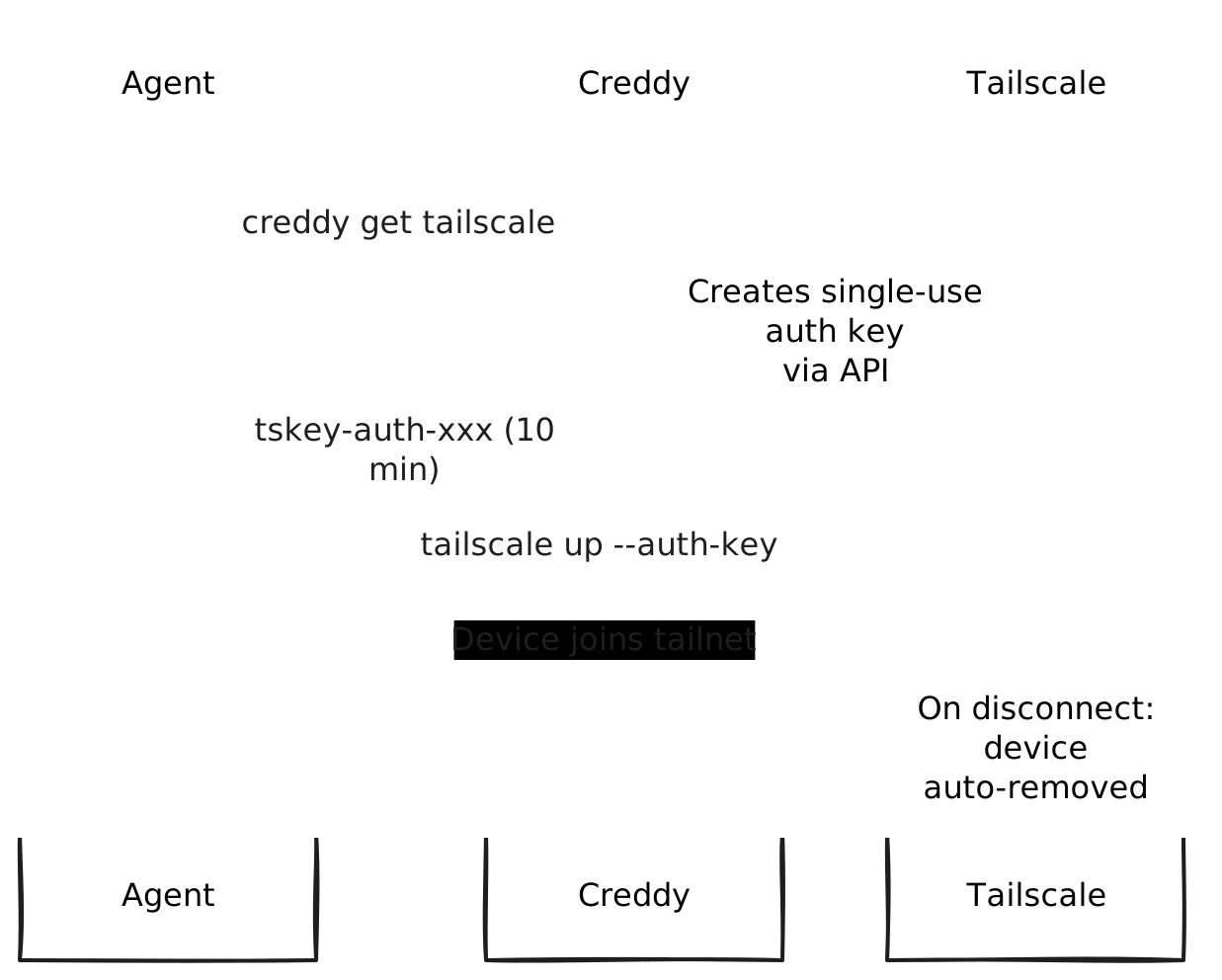
- Agent requests
creddy get tailscale - Creddy creates a single-use auth key via Tailscale API
- Agent runs
tailscale up --auth-key=<key> - Device joins the tailnet with configured ACL tags
- When device disconnects → automatically removed (ephemeral)
- On TTL expiry → key revoked (can't be used)
Key benefits:
- No hardcoded auth keys in CI/CD or agent configs
- Devices are ephemeral (auto-cleaned on disconnect)
- ACL tags control network access
- Keys are single-use and time-limited
Requirements
- Tailscale account with API access
- API key from Tailscale Admin Console
Installation
creddy plugin install tailscaleServer Setup
Add the backend with your Tailscale API key:
creddy backend add tailscaleYou'll be prompted for:
- api_key: Tailscale API key
- tailnet: Your tailnet name (e.g.,
mycompany.com)
Configuration Options
{
  "api_key": "tskey-api-xxx",
  "tailnet": "mycompany.com",
  "default_tags": ["tag:agent"],
  "ephemeral": true,
  "preauthorized": true
}| Option | Description | Default |
|---|---|---|
api_key | Tailscale API key (required) | — |
tailnet | Tailnet name (required) | — |
default_tags | ACL tags for all devices | [] |
ephemeral | Auto-remove on disconnect | true |
preauthorized | Skip manual device approval | true |
Agent Enrollment
Agents request Tailscale access during enrollment:
creddy enroll --server http://creddy:8400 --name ci-agent \
--can tailscaleAuthentication: Agents can authenticate to Creddy using either vend tokens (
ckr_xxx) or OIDC (client_id/client_secret). Both work with Tailscale.
Or with specific tags:
creddy enroll --server http://creddy:8400 --name ci-agent \
  --can tailscale:tag:ci
Requesting Auth Keys
Once enrolled and approved:
# Get an auth key (default 10 min TTL)
AUTH_KEY=$(creddy get tailscale)

# Join the tailnet
tailscale up --auth-key=$AUTH_KEY
With Specific Tags
# Request a key with specific ACL tag
AUTH_KEY=$(creddy get tailscale --scope tailscale:tag:ci)
tailscale up --auth-key=$AUTH_KEY
Custom TTL
# Key valid for 30 minutes
AUTH_KEY=$(creddy get tailscale --ttl 30m)
Use Cases
CI/CD Pipeline
# GitHub Actions
jobs:
  deploy:
    steps:
      - name: Join tailnet
        run: |
          AUTH_KEY=$(creddy get tailscale --ttl 30m)
          sudo tailscale up --auth-key=$AUTH_KEY

      - name: Access internal services
        run: |
          curl http://internal-api.tail123.ts.net/deploy

      - name: Leave tailnet
        run: sudo tailscale down
Ephemeral VMs
#!/bin/bash
# VM startup script

# Get auth key from Creddy
AUTH_KEY=$(creddy get tailscale)

# Join tailnet
tailscale up --auth-key=$AUTH_KEY --hostname="worker-$(hostname)"

# VM is now on the tailnet
# When VM shuts down, device auto-removes
AI Agents
import subprocess
import os

# Agent needs to access internal API
auth_key = subprocess.check_output(
    ["creddy", "get", "tailscale", "--ttl", "1h"]
).decode().strip()

subprocess.run(["tailscale", "up", f"--auth-key={auth_key}"])

# Now agent can reach internal services
response = requests.get("http://internal-llm.tail123.ts.net/v1/chat")
Scopes
| Scope | Description |
|---|---|
tailscale | Create auth keys with default tags |
tailscale:tag:* | Create keys with specific ACL tag |
Examples:
tailscale— usesdefault_tagsfrom configtailscale:tag:ci— device getstag:citailscale:tag:prod-agent— device getstag:prod-agent
TTL Constraints
- Minimum TTL: 1 minute
- Maximum TTL: 24 hours
- Default TTL: 10 minutes
ACL Configuration
Use Tailscale ACLs to control what devices can access:
{
  "acls": [
    // CI agents can only reach internal APIs
    {"action": "accept", "src": ["tag:ci"], "dst": ["tag:api:*"]},

    // Production agents have broader access
    {"action": "accept", "src": ["tag:prod-agent"], "dst": ["*:*"]}
  ],
  "tagOwners": {
    "tag:ci": ["group:devops"],
    "tag:prod-agent": ["group:sre"],
    "tag:agent": ["group:platform"]
  }
}
Security Considerations
Auth Key Security
- Keys are single-use (only one device can join)
- Keys are ephemeral (device removed on disconnect)
- Keys have TTL (expire even if unused)
- Keys are pre-authorized (no manual approval step)
Network Access
Devices joining via Creddy are controlled by:
- ACL tags — what they can access on the tailnet
- Ephemeral flag — auto-removed on disconnect
- TTL — limited window to use the key
Best Practices
- Use specific tags per use case (
tag:ci,tag:staging-agent) - Keep TTLs short for untrusted environments
- Review Tailscale admin logs for unusual join patterns
- Use ACLs to limit blast radius
Troubleshooting
"invalid API key"
Ensure your API key:
- Is a valid Tailscale API key (starts with
tskey-api-) - Has permission to create auth keys
- Hasn't expired
"tailnet not found"
Check the tailnet name matches exactly:
- For personal accounts: your email domain or
gmail.com - For organizations: the organization name from admin console
Device not joining
- Check key hasn't expired:
creddy get tailscalegenerates fresh key - Check Tailscale daemon is running:
tailscale status - Check for conflicting state:
tailscale logoutthen retry
ACL errors
If device joins but can't reach services:
- Verify tags are applied:
tailscale status - Check ACL rules allow the tag to access the destination
- Review Tailscale admin logs for denied connections