Anthropic Integration
⚠️ Proxy Mode: Anthropic’s API doesn’t support creating ephemeral API keys. Creddy works around this by proxying requests — your agents call Creddy, which forwards to Anthropic using your real key.
Agents get short-lived crd_xxx tokens that work through Creddy’s proxy endpoint. Your actual API key stays secure on the server.
How It Works
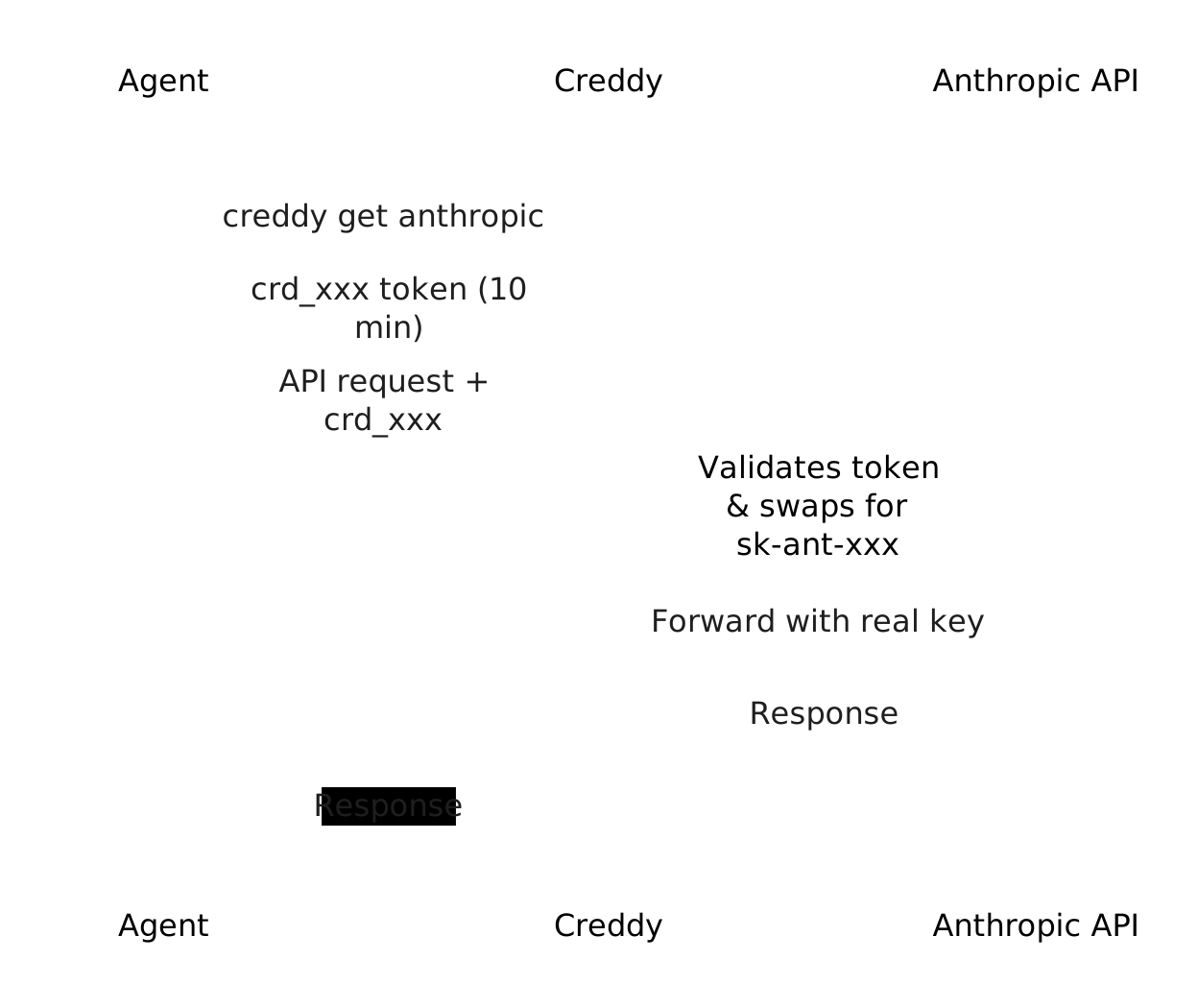
- Agent requests
creddy get anthropic - Plugin generates a short-lived
crd_xxxtoken - Agent makes API calls to
http://creddy:8400/v1/proxy/anthropic/... - Creddy routes to the Anthropic plugin
- Plugin validates the token, swaps it for your real API key, forwards to Anthropic
- On TTL expiry or revocation → token stops working immediately
Key benefits:
- Your real API key never leaves the server
- Agents only need to know the main Creddy endpoint (no extra ports)
- Tokens can be instantly revoked
- Full audit trail of which agent used what, when
Requirements
- Anthropic API key (
sk-ant-...) from console.anthropic.com
Installation
creddy plugin install anthropicServer Setup
Add the backend with your Anthropic API key:
creddy backend add anthropicYou’ll be prompted for your API key:
Adding backend 'anthropic'...

api_key (Anthropic API key): sk-ant-api03-xxxxx

✓ Backend 'anthropic' added.
Or pass it directly:
creddy backend add anthropic --api-key sk-ant-api03-xxxxxAgent Enrollment
Agents request Anthropic access during enrollment:
creddy enroll --server http://creddy:8400 --name my-agent \
--can anthropicAuthentication: Agents can authenticate to Creddy using either vend tokens (
ckr_xxx) or OIDC (client_id/client_secret). Both work with Anthropic.
Requesting Tokens
Once enrolled and approved:
# Get a token (default 10 min TTL)
creddy get anthropic

# Get a token with custom TTL (max 1 hour)
creddy get anthropic --ttl 30m
Using the Proxy
All API calls go through http://creddy:8400/v1/proxy/anthropic/...
With Claude CLI
export ANTHROPIC_AUTH_TOKEN=$(creddy get anthropic --ttl 1h)
export ANTHROPIC_BASE_URL=http://creddy:8400/v1/proxy/anthropic
export ANTHROPIC_API_KEY=""  # Must be empty to skip OAuth

claude "Hello, world"
With Python SDK
import anthropic

client = anthropic.Anthropic(
    api_key="crd_xxx",  # from creddy get
    base_url="http://creddy:8400/v1/proxy/anthropic"
)

message = client.messages.create(
    model="claude-sonnet-4-20250514",
    max_tokens=1024,
    messages=[{"role": "user", "content": "Hello!"}]
)
With curl
TOKEN=$(creddy get anthropic)

curl http://creddy:8400/v1/proxy/anthropic/v1/messages \
  -H "Content-Type: application/json" \
  -H "x-api-key: $TOKEN" \
  -H "anthropic-version: 2023-06-01" \
  -d '{
    "model": "claude-sonnet-4-20250514",
    "max_tokens": 256,
    "messages": [{"role": "user", "content": "Hello!"}]
  }'
Token Lifecycle
TTL Constraints
- Minimum TTL: 1 minute
- Maximum TTL: 1 hour
- Default TTL: 10 minutes
Expiry
When a token’s TTL expires, the proxy immediately rejects it:
# Request a 5-minute token
creddy get anthropic --ttl 5m

# After 5 minutes, requests fail:
# 401 Unauthorized: token expired
Revocation
When an agent is unenrolled, all their tokens are immediately invalidated:
creddy unenroll my-agent
# All crd_xxx tokens for my-agent stop working instantly
Streaming Support
The proxy fully supports SSE streaming for /v1/messages:
import anthropic

client = anthropic.Anthropic(
    api_key="crd_xxx",
    base_url="http://creddy:8400/v1/proxy/anthropic"
)

with client.messages.stream(
    model="claude-sonnet-4-20250514",
    max_tokens=1024,
    messages=[{"role": "user", "content": "Write a haiku"}]
) as stream:
    for text in stream.text_stream:
        print(text, end="", flush=True)
Security Considerations
API Key Protection
Your real API key (sk-ant-xxx) is:
- Stored encrypted in Creddy’s database
- Never exposed to agents
- Only used server-side by the plugin
Token Security
crd_xxx tokens are:
- Short-lived (max 1 hour)
- Scoped to specific agents
- Instantly revocable
- Only valid through Creddy’s proxy (not directly with Anthropic)
Network Security
Run Creddy on a private network or Tailscale. The proxy endpoint is on the same port as the rest of Creddy’s API (default 8400).
Comparison with Direct API Keys
| Aspect | Direct API Key | Creddy Proxy |
|---|---|---|
| Lifetime | Forever | Minutes to hours |
| Revocation | Manual in Console | Instant via CLI |
| Key exposure | Agents see real key | Agents see crd_xxx only |
| Audit | Check Console | Full trail in Creddy |
| Agent compromise | Full API access | Limited window + revoke |
Troubleshooting
”401 Unauthorized” from proxy
Check token validity:
# Is the token format correct?
echo $ANTHROPIC_AUTH_TOKEN  # Should be crd_xxx

# Is it expired?
creddy active  # Shows active tokens with expiry
“502 Bad Gateway”
The Anthropic plugin proxy isn’t reachable. Check:
creddy backend status anthropicStreaming not working
Ensure your HTTP client supports SSE and doesn’t buffer responses. The proxy passes through Transfer-Encoding: chunked and Content-Type: text/event-stream correctly.
Rate limits
Rate limits apply to your underlying Anthropic API key. If you hit limits, all agents using that key are affected. Consider using separate Anthropic accounts for different environments.