Doppler Integration
✅ Vend Mode: Creddy creates real Doppler service tokens. Agents use them directly with Doppler’s API/CLI.
🚧 Coming Soon — This integration is not yet available.
Creddy’s Doppler integration creates scoped service tokens that give agents access to specific project secrets. Tokens are ephemeral — created on-demand and automatically revoked when they expire or when an agent is unenrolled.
How It Works
Creddy uses Doppler’s API to manage service tokens:
- Agent requests
creddy get doppler --project myapp --config prd - Creddy creates a scoped service token via Doppler API
- Returns the token to the agent
- On TTL expiry or unenroll → Creddy revokes the token
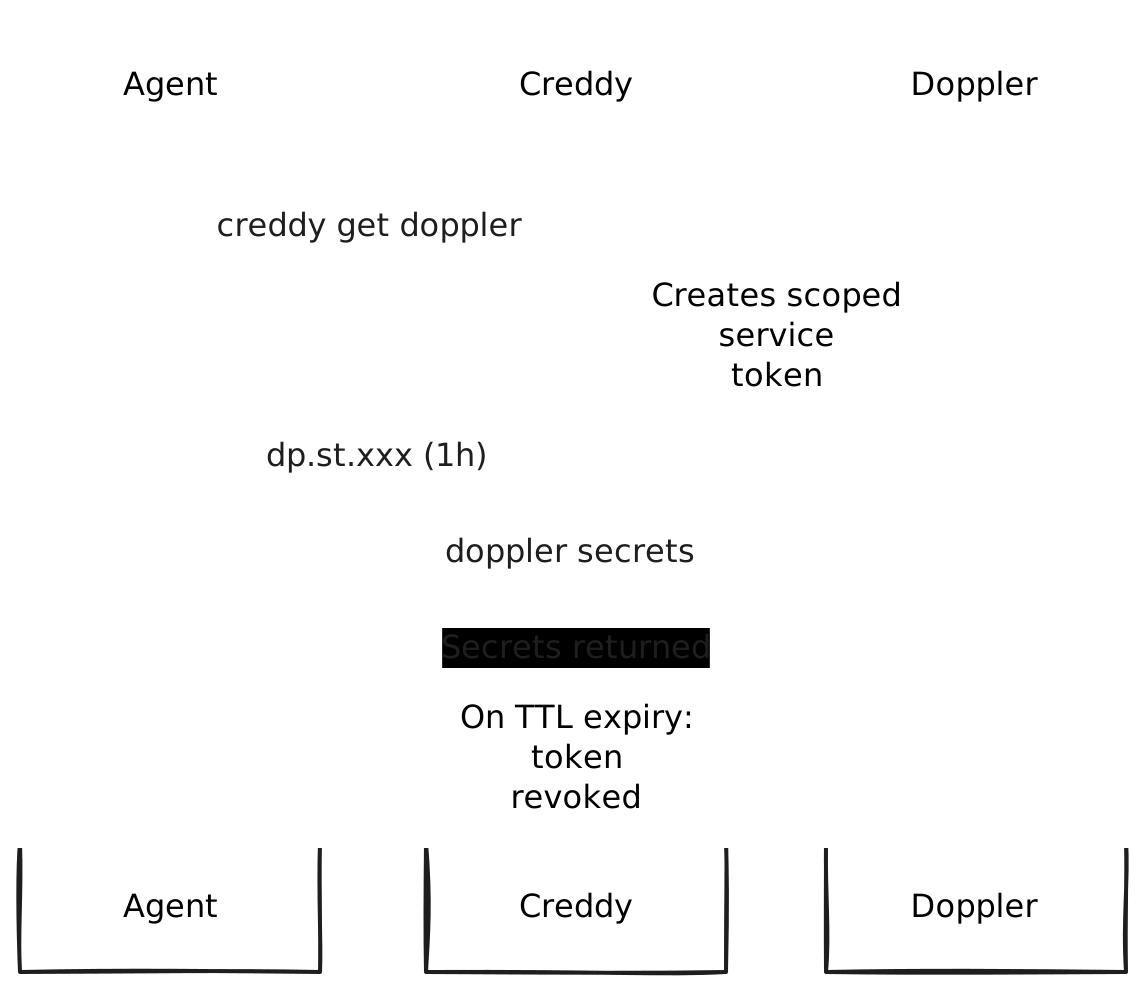
Unlike static service tokens that live forever, Creddy tokens are automatically cleaned up.
Requirements
- Doppler account — Any plan
- Workplace token — With permission to create service tokens
- Projects configured — The projects agents will access
Installation
creddy plugin install dopplerConfiguration
1. Get a Doppler Token
You need a token that can manage service tokens. Options:
Option A: Personal Token (simpler)
- Go to dashboard.doppler.com
- Click your avatar → Tokens
- Generate a Personal Token
- Save it securely
Option B: Service Account (recommended for production)
- Settings → Service Accounts
- Create a service account for Creddy
- Grant it “Service Token Manager” role on relevant projects
- Generate a token for the service account
2. Configure Creddy
creddy backend add doppler \
  --token "dp.pt.xxxx"
Or via API:
curl -X POST http://localhost:8400/v1/admin/backends \
  -H "Content-Type: application/json" \
  -d '{
    "type": "doppler",
    "name": "doppler",
    "config": {
      "token": "dp.pt.xxxx"
    }
  }'
Agent Enrollment
Agents request access to specific projects and configs during enrollment:
Authentication: Agents can authenticate to Creddy using either vend tokens (
ckr_xxx) or OIDC (client_id/client_secret). Both work with Doppler.
# Access to production config
creddy enroll --server http://creddy:8400 --name deploy-bot \
  --can doppler:myapp/prd

# Access to multiple configs
creddy enroll --server http://creddy:8400 --name dev-bot \
  --can doppler:myapp/dev \
  --can doppler:myapp/stg

# Read-only access
creddy enroll --server http://creddy:8400 --name readonly-bot \
  --can doppler:myapp/prd:read
Scope Format
doppler:project/config[:permission]| Scope | Access |
|---|---|
doppler:myapp/prd | Read/write to myapp production |
doppler:myapp/prd:read | Read-only to myapp production |
doppler:myapp/* | All configs in myapp project |
doppler:* | All projects (use sparingly) |
Requesting Tokens
Once enrolled and approved:
# Get a token for a specific config
creddy get doppler --project myapp --config prd

# With custom TTL
creddy get doppler --project myapp --config prd --ttl 2h

# Read-only token
creddy get doppler --project myapp --config prd --read-only
Using with Doppler CLI
# Set the token
export DOPPLER_TOKEN=$(creddy get doppler --project myapp --config prd)

# Fetch secrets
doppler secrets

# Run with secrets injected
doppler run -- ./my-app
Using with Direct API
# Get token
TOKEN=$(creddy get doppler --project myapp --config prd)

# Fetch secrets via API
curl -s "https://api.doppler.com/v3/configs/config/secrets/download?format=json" \
  -H "Authorization: Bearer $TOKEN"
Using in Scripts
#!/bin/bash
# deploy.sh - Deployment script with ephemeral secrets access

# Get a short-lived token for this deployment
export DOPPLER_TOKEN=$(creddy get doppler --project myapp --config prd --ttl 10m)

# Deploy with secrets
doppler run -- kubectl apply -f deployment.yaml

# Token auto-revokes after TTL even if script crashes
Token Lifecycle
TTL Expiry
Tokens are automatically revoked when their TTL expires:
# Request a 30-minute token
creddy get doppler --project myapp --config prd --ttl 30m

# After 30 minutes, Creddy's reaper:
# 1. Calls Doppler API to revoke the token
# 2. Removes it from the active credentials database
The token stops working immediately — it’s revoked at Doppler, not just in Creddy.
Agent Unenroll
When an agent is unenrolled, all their active tokens are revoked:
# Admin unenrolls an agent
creddy unenroll deploy-bot

# Creddy:
# 1. Finds all active Doppler tokens for deploy-bot
# 2. Revokes each token via Doppler API
# 3. Removes the agent
Multi-Project Access
Agents can have access to multiple projects:
# Enrollment with multiple projects
creddy enroll --server http://creddy:8400 --name infra-bot \
  --can doppler:frontend/prd \
  --can doppler:backend/prd \
  --can doppler:shared-secrets/prd:read
Request tokens for each project separately:
FRONTEND_TOKEN=$(creddy get doppler --project frontend --config prd)
BACKEND_TOKEN=$(creddy get doppler --project backend --config prd)
Example: CI/CD Pipeline
# .github/workflows/deploy.yml
jobs:
  deploy:
    runs-on: ubuntu-latest
    steps:
      - uses: actions/checkout@v4

      - name: Get Doppler token
        run: |
          export DOPPLER_TOKEN=$(creddy get doppler \
            --server ${{ secrets.CREDDY_URL }} \
            --project myapp \
            --config prd \
            --ttl 15m)
          echo "DOPPLER_TOKEN=$DOPPLER_TOKEN" >> $GITHUB_ENV

      - name: Deploy
        run: |
          doppler run -- ./deploy.sh
Example: Kubernetes Sidecar
# Pod with Creddy sidecar for secret refresh
apiVersion: v1
kind: Pod
metadata:
  name: myapp
spec:
  containers:
    - name: app
      image: myapp:latest
      env:
        - name: DOPPLER_TOKEN
          valueFrom:
            secretKeyRef:
              name: doppler-token
              key: token

    - name: creddy-sidecar
      image: creddy:latest
      command:
        - /bin/sh
        - -c
        - |
          while true; do
            TOKEN=$(creddy get doppler --project myapp --config prd --ttl 1h)
            kubectl create secret generic doppler-token \
              --from-literal=token=$TOKEN \
              --dry-run=client -o yaml | kubectl apply -f -
            sleep 3000  # Refresh every 50 min
          done
Audit Trail
All token operations are logged:
creddy audit --limit 10Shows which agent requested tokens for which project/config, when, and the token’s TTL.
Security Considerations
Token Hierarchy
Doppler has a token hierarchy:
- Personal tokens — tied to a user, broad access
- Service account tokens — scoped to roles, recommended for Creddy
- Service tokens — what Creddy creates, scoped to single config
Creddy creates service tokens (most limited), using your personal/SA token (more privileged).
Principle of Least Privilege
- Grant agents only the configs they need
- Use
:readsuffix when write isn’t required - Prefer specific project/config over wildcards
- Use short TTLs for sensitive configs
Audit Access
Doppler logs all secret access. Combined with Creddy’s audit:
- Creddy: Who requested tokens, when
- Doppler: What secrets were accessed
Comparison with Static Service Tokens
| Aspect | Static Token | Creddy Ephemeral |
|---|---|---|
| Lifetime | Forever | Minutes to hours |
| Scope | Single config | Single config |
| Revocation | Manual | Automatic on TTL/unenroll |
| Audit | Doppler only | Creddy + Doppler |
| Agent compromise | Permanent exposure | Limited window |
| Token rotation | Manual | Automatic |
Troubleshooting
”Permission denied creating service token”
Your Creddy token doesn’t have permission to create service tokens in that project. Check:
- Personal token: You need access to the project
- Service account: Needs “Service Token Manager” role
”Project not found”
Verify the project name matches exactly (case-sensitive):
doppler projects“Config not found”
Verify the config exists:
doppler configs --project myappToken not working
If token shows as active in Creddy but doesn’t work:
# Check active credentials
creddy list

# Test the token directly
curl -s "https://api.doppler.com/v3/me" \
  -H "Authorization: Bearer $DOPPLER_TOKEN"